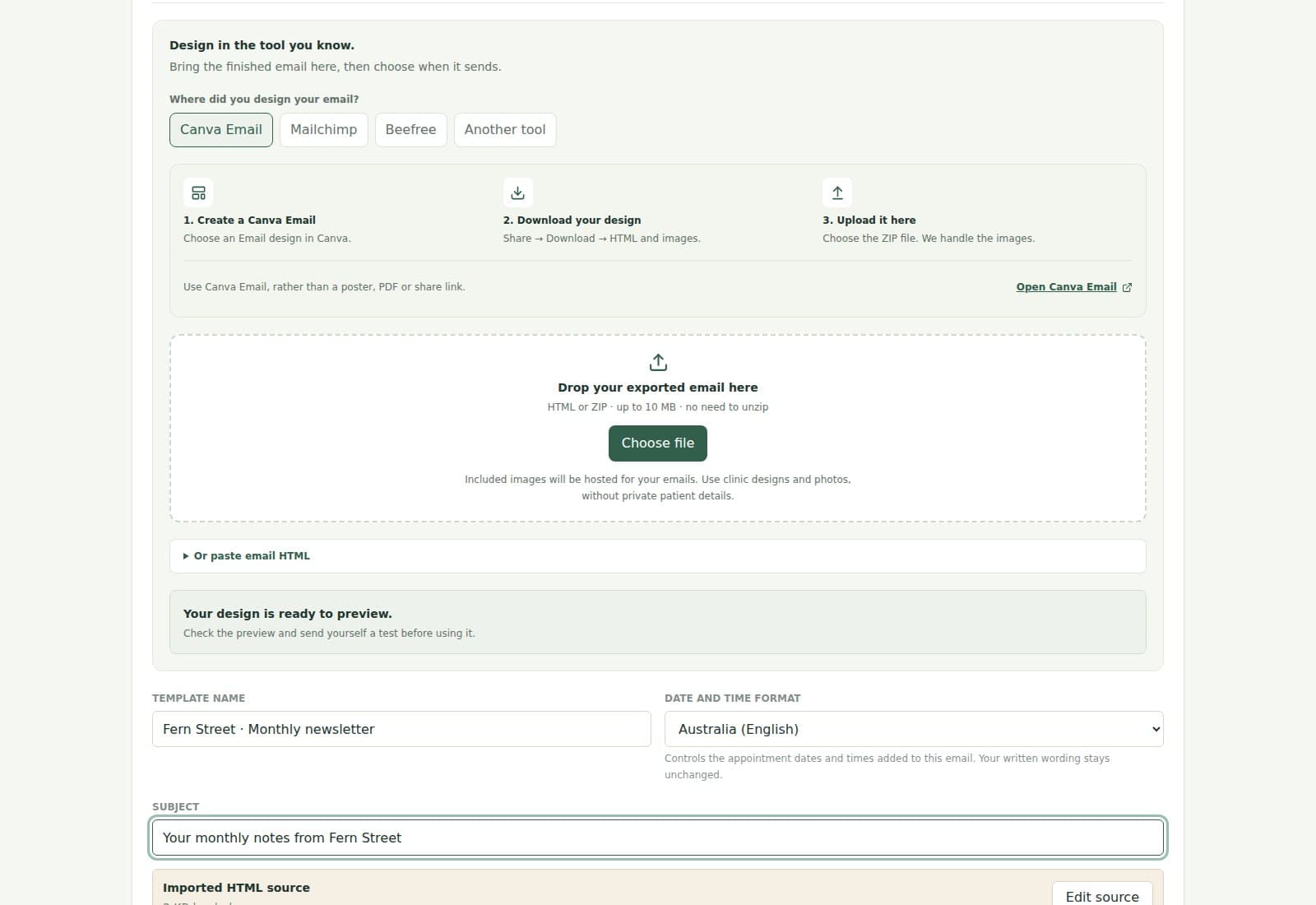
1. Export your email
Use a Canva Email or Beefree design and download its HTML-and-images ZIP. Mailchimp exports work for custom-coded templates.
Cliniko email templates
Bring a finished email from Canva Email, Mailchimp or Beefree. Add patient names, appointment details and your booking link, then use it for automated emails or your next newsletter.
Bring your design
Use a Canva Email or Beefree design and download its HTML-and-images ZIP. Mailchimp exports work for custom-coded templates.
Choose Bring your design in Emails, or import during Quick setup. We host images included in the ZIP, so there is no separate image upload to arrange.
Add the Cliniko details you need, check your phone and desktop previews, and send a test. Save it for a campaign or choose when it sends automatically.
Ready-made emails, included
Choose from more than 100 clinic designs for reminders, aftercare, recalls and newsletters. Add your words, colours, links and images.
Prefer to build here? Our free email designer is available too, with layouts, images and buttons you can arrange yourself.
Email design examples
Nova
SKIN STUDIO / QUIET CARE
14 MAY 2026
BRISBANE

APPOINTMENT CONFIRMED
Hello Alex. Your first visit with Taylor is confirmed. Everything you need for a calm arrival is below.
When
Thursday 14 May, 11:30am
Treatment
First visit
Practitioner
Taylor Morgan
Studio
45 James Street, Brisbane
BEFORE WE MEET
Come as you are.
We will begin with a thoughtful consultation and shape the visit around what your skin needs.
Complete your form →NOVA SKIN STUDIO
WITH CARE / BRISBANE
Useful starting points
Confirm the booking, introduce the clinic, and share the practical details a patient needs before their first visit.
Share arrival guidance and preparation notes. Include a Cliniko patient form link in the email to choose the form during automation setup.
Keep instructions clear after a visit, check in later, or send a useful next step without creating another front-desk task.
Bring your clinic style to a gentle rebooking prompt, with recalls up to 18 calendar months after a visit.
Prepare each newsletter with your saved designs and audience, then send it now or schedule it ahead.
Invite first-visit patients to a private recommendation survey, or send your own public review link in a separate follow-up.
Personalised from Cliniko
Add the details you need to the email, preview the result, and send yourself a test before turning anything on.
First name and other patient details used to personalise the email.
Date, time, service, practitioner, and booking details from the matching appointment.
The appointment location name and address, including the correct location for multi-site clinics.
Clinic name, website, phone number, booking link, and saved clinic details.
Reusable clinic wording that can be placed wherever the template needs it.
Common questions
No. Design in Canva Email or another email builder, download the email export and upload it here. You do not need to edit code. You can also choose a ready-made clinic email or use our built-in editor.
Yes. Start with Email on Canva's homepage and check Share → Download offers HTML and images before editing. Some Email Newsletter templates only export images or PDFs; adapt their content in a new Canva Email instead. Upload the ZIP through Bring your design in Emails. Beefree exports, HTML files and pasted email HTML also work. Mailchimp supports export for custom-coded templates, not its drag-and-drop designs.
Yes. Use a saved email in automations and campaigns, update its design, or make a separate copy. Before changing an email used by an automation, we show which automations may be affected.
Yes. When you import an HTML-and-images ZIP, we host the included supported images and connect them to your email automatically. Images already linked to an external website keep their existing links. Always preview and send yourself a test after importing.
Open Quick setup at the top of the dashboard to choose a design and set its timing in one flow. Or open a saved email and choose Use in an automation. You can save an automation draft, check the preview and turn it on when you are ready.
Templates are included in every plan